 Lukla Data Studio
Docs Editor
Running queries
Run a statement, a selection or a whole script; parameters, transactions, the guard against risky statements, history, and running one query on several servers or databases.
On this page
#Run what you mean
| Shortcut | Runs |
|---|---|
| ⌘↩ | The statement under the cursor (it's shaded), or the selection. |
| ⇧⌘↩ | The whole script, batch by batch. GO separates batches and GO 5 runs the batch above it five times. |
| F5 | The selection if there is one, otherwise the whole script (as in SSMS). |
| ⌘. | Cancels the running query. |
| ⌘F5 | Parses without running: the server checks the syntax and names. |
Results stream into the grid as they arrive. PRINT output, row counts and errors go to Messages, where each error links to its line in the editor.
#Parameters
A query that uses a variable it never declares, such as @customer, can still run: the ⓟ sheet asks for a type and a value for each one, or NULL. The query is then sent with sp_executesql and the values as real parameters, never pasted into the SQL.
SELECT OrderID, OrderDate, Freight
FROM dbo.Orders
WHERE CustomerID = @customer
  AND OrderDate >= @since;
Types are guessed from how each variable is used (@customer gets CustomerID's type). Turn the sheet off with the ⓟ toggle in the toolbar to run such scripts unchanged.
#Transactions
The Tx menu in the toolbar sets each tab's transaction mode:
- Auto commits each statement, the server's default.
- Manual runs with
SET IMPLICIT_TRANSACTIONS ON, so changes stay in an open transaction until you press Commit or Rollback.
When a transaction is open, an orange Tx open badge shows on the tab's toolbar. Closing the tab, quitting, or switching its connection asks whether to commit or roll back first.
#The guard against risky statements
Some statements can't be taken back, so Lukla asks before running them:
UPDATEorDELETEwithout aWHERE, even insideIF,BEGIN…END,TRY/CATCHor after a CTE. By default this asks on every connection.DROP,TRUNCATE TABLEandALTER TABLE … DROP COLUMN, with a level per environment: production makes you type the database name, staging and test ask, development doesn't.
DELETE FROM dbo.[Order Details];        -- asks: this deletes every row
DROP TABLE dbo.Customers;               -- on production: type the database name to run it
DROP TABLE #work;                       -- never asks: temp tables and table variables are yours
Statements inside CREATE or ALTER PROCEDURE never ask, because they don't run there. Change the levels in Settings ▸ Editor.
#History
Every run is kept with its server, database, row count and time. The History pane in the sidebar (⌘0 shows the sidebar) searches them; right-click one to open it in a new tab or insert it at the cursor. Save as Favourite keeps a query in the pane's Favourites section.
#Run on several servers or databases
Query ▸ Run on Several Servers… runs one query on many servers and merges the results into one grid, led by Server and Database columns. Pick where it runs:
- each server's default database, one named database, or every user database on each server;
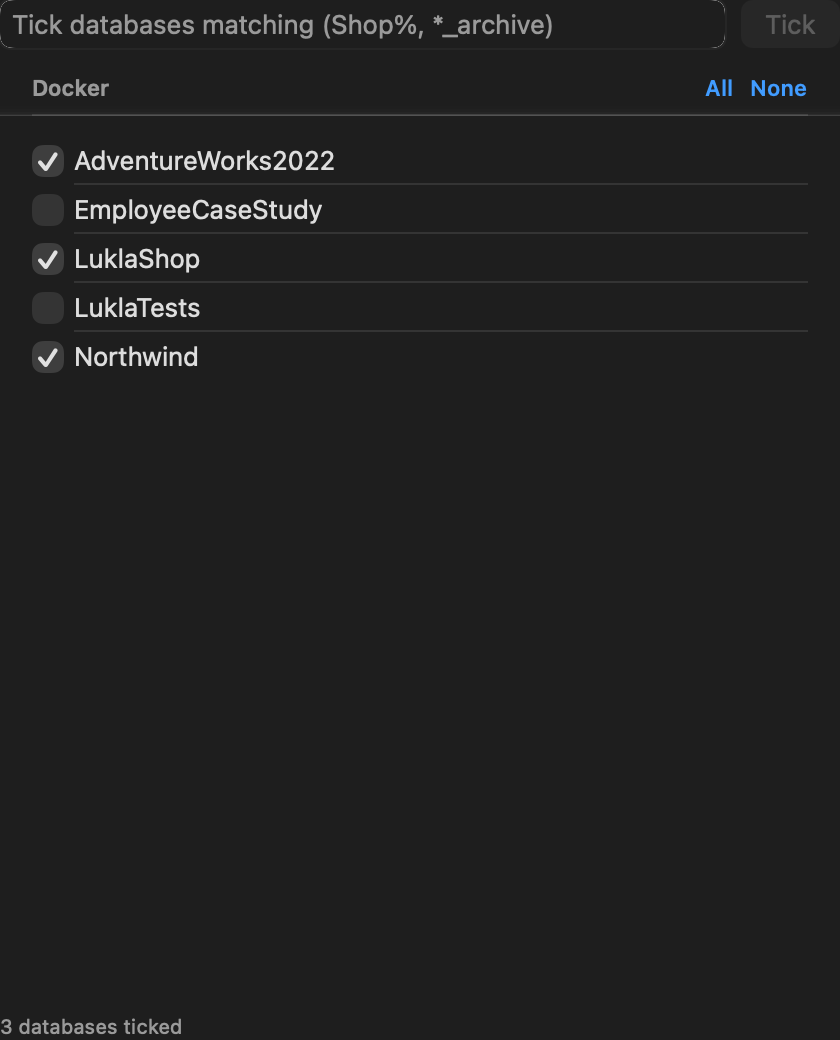
- Run on Several Databases…: tick databases per server, or tick every database whose name matches patterns such as
Shop%, *_archive.
For example, to find which databases still have an old table:
SELECT DB_NAME() AS DatabaseName, COUNT(*) AS Rows
FROM dbo.OrderArchive;
A server or database where the query fails shows its error; the others still run. It asks first when a server is production, or when the query changes every row or drops something.