 Lukla Data Studio
Docs Database tools
Data Compare
Compare the rows of two tables on any servers, matched by key, see the differences side by side, and generate a script that makes the target match.
On this page
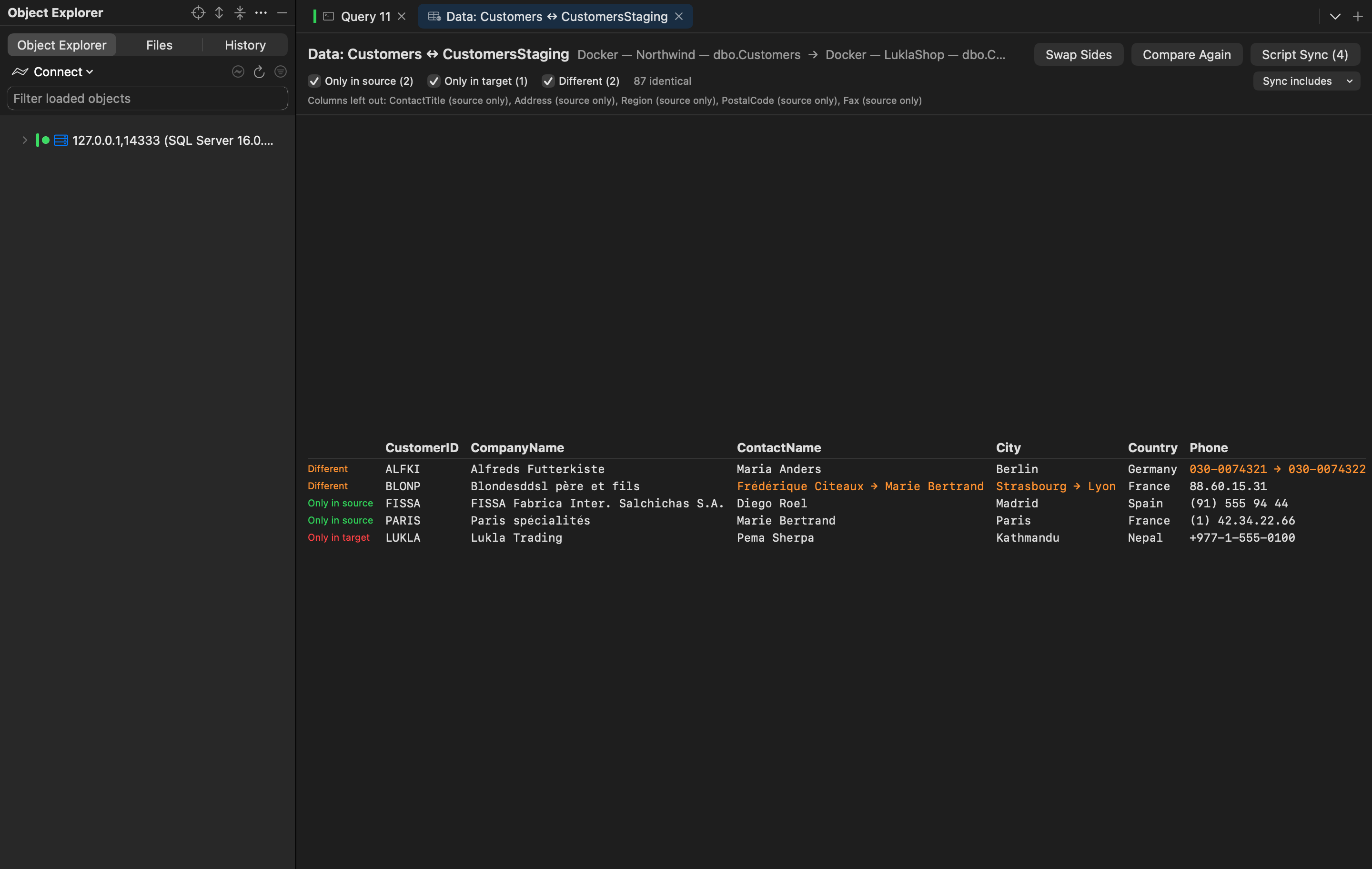
Right-click a table ▸ Compare Data With… and pick the other table, on the same server or another connected one: staging against production, a restored backup against live, a copy before and after a job.
#How rows are matched
Rows are matched by the source table's primary key (or a unique key), so the tables don't need to be in the same order. Columns are matched by name; columns only one side has are listed and left out.
The result shows three kinds of difference, each a checkbox, plus how many rows are identical:
- Only in source: rows the target is missing;
- Only in target: rows the source doesn't have;
- Different: rows in both whose values differ. The changed values show as
old → new, highlighted.
Swap Sides exchanges source and target; Compare Again reads both tables again.
#The sync script
Script Sync opens a script that makes the target match the source, in one transaction, in a query tab. Sync includes ▾ chooses what it does: inserts and updates by default, and deletes only when you tick them, since removing rows is the step people regret.
SET XACT_ABORT ON;
BEGIN TRANSACTION;

-- Rows that differ
UPDATE [dbo].[CustomersStaging] SET [Phone] = N'030-0074321' WHERE [CustomerID] = N'ALFKI';
UPDATE [dbo].[CustomersStaging] SET [ContactName] = N'Frédérique Citeaux', [City] = N'Strasbourg' WHERE [CustomerID] = N'BLONP';

-- Rows only in the source
INSERT INTO [dbo].[CustomersStaging] ([CustomerID], [CompanyName], [ContactName], [City], [Country], [Phone])
VALUES (N'FISSA', N'FISSA Fabrica Inter. Salchichas S.A.', N'Diego Roel', N'Madrid', N'Spain', N'(91) 555 94 44');

COMMIT TRANSACTION;
Tables with an identity column get SET IDENTITY_INSERT … ON around the inserts. Nothing runs until you run the script.