 Lukla Data Studio
Docs Start here
Keyboard shortcuts
Every shortcut in Lukla Data Studio, in the four built-in keymaps (Lukla, SSMS, JetBrains and VS Code), and how to change them.
On this page
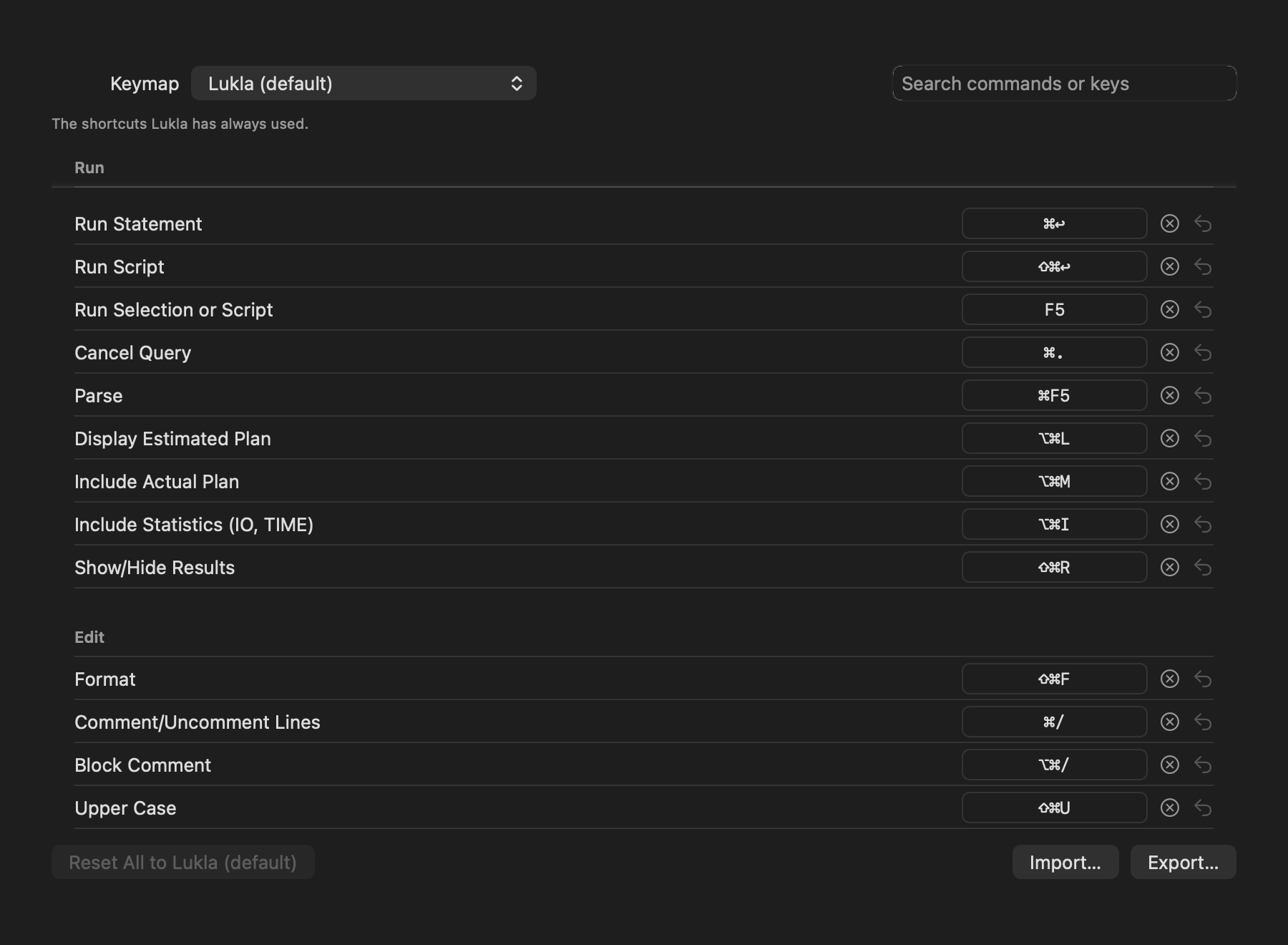
Lukla Data Studio ships four keymaps, so the shortcuts you already know keep working. Pick one in Settings ▸ Keyboard, then change any shortcut you like.
#Choose a keymap
| Keymap | For people coming from |
|---|---|
| Lukla (default) | The shortcuts Lukla has always used. |
| SQL Server Management Studio | SSMS's Ctrl shortcuts with ⌘ for Ctrl. Ctrl+M (actual plan) is ⌥⌘M because ⌘M minimises; two-step chords such as Ctrl+K, Ctrl+C use their single-key equivalents. |
| JetBrains (DataGrip, Rider) | DataGrip and Rider's macOS keymap. |
| VS Code / Azure Data Studio | VS Code's and Azure Data Studio's macOS keymap. Two-step chords use single-key equivalents. |
The Lukla and SSMS keymaps also open quick fixes with ⌘., as other IDEs do, alongside ⌥↩.
#Change a shortcut
- Open Settings ▸ Keyboard and find the command (the search box matches command names and keys).
- Click its shortcut and press the new keys.
- To remove a shortcut, click ⊗; to go back to the keymap's own, click ↺.
Shortcuts two commands share are flagged, and ones macOS keeps for itself (such as ⌘Q and ⌘H) are refused. Reset All returns every command to the keymap's defaults.
#Share a keymap with your team
Export… saves your keymap, with your changes, as a JSON file; Import… loads one. Shortcuts that can't be used on this Mac are listed and skipped.
#Every shortcut
The editor's own commands (comment, duplicate, move and join lines, expand selection, quick fixes) work while the editor has focus; the rest are menu commands and work anywhere in the window.
#Run
| Command | Lukla | SSMS | JetBrains | VS Code |
|---|---|---|---|---|
| Run Statement | ⌘↩ | ⌘↩ | ⌘↩ | ⌘↩ |
| Run Script | ⇧⌘↩ | ⌘E | ⇧⌘↩ | ⇧⌘E |
| Run Selection or Script | F5 | F5 | — | F5 |
| Cancel Query | ⌘. | ⌘. | ⌘F2 | ⌥⌘. |
| Parse | ⌘F5 | ⌘F5 | — | ⌘F5 |
| Display Estimated Plan | ⌥⌘L | ⌘L | ⌥⌘E | ⌘L |
| Include Actual Plan | ⌥⌘M | ⌥⌘M | ⌥⌘M | ⌥⌘M |
| Include Statistics (IO, TIME) | ⌥⌘I | ⌥⌘I | ⌥⌘I | ⌥⌘I |
| Show/Hide Results | ⇧⌘R | ⌘R | ⌘4 | ⇧⌘R |
#Edit
| Command | Lukla | SSMS | JetBrains | VS Code |
|---|---|---|---|---|
| Format | ⇧⌘F | ⇧⌘F | ⌥⌘L | ⌥⇧F |
| Comment/Uncomment Lines | ⌘/ | ⌘/ | ⌘/ | ⌘/ |
| Block Comment | ⌥⌘/ | ⌥⌘/ | ⌥⌘/ | ⌥⌘/ |
| Upper Case | ⇧⌘U | ⇧⌘U | — | ⇧⌘U |
| Lower Case | ⇧⌘L | ⇧⌘L | — | — |
| Toggle Case | — | — | ⇧⌘U | — |
| Duplicate Line or Selection | ⌘D | ⌘D | ⌘D | ⌥⇧↓ |
| Delete Line | ⇧⌘K | ⇧⌘K | ⌘⌫ | ⇧⌘K |
| Move Line Up | ⌥⇧↑ | ⌥↑ | ⌥⇧↑ | ⌥↑ |
| Move Line Down | ⌥⇧↓ | ⌥↓ | ⌥⇧↓ | ⌥↓ |
| Join Lines | ⌃⇧J | ⌃⇧J | ⌃⇧J | ⌃⇧J |
| Expand Selection | ⌃⇧↑ | ⌥⇧= | ⌥↑ | ⌃⇧⌘→ |
| Shrink Selection | ⌃⇧↓ | ⌥⇧- | ⌥↓ | ⌃⇧⌘← |
| Show Completions | ⌃Space | ⌃Space | ⌃Space | ⌃Space |
| Quick Fixes | ⌥↩ | ⌥↩ | ⌥↩ | ⌥↩ |
| Rename Alias/Variable | ⇧F6 | F2 | ⇧F6 | F2 |
#Navigate
| Command | Lukla | SSMS | JetBrains | VS Code |
|---|---|---|---|---|
| Go to Line… | ⌘L | ⌘G | ⌘L | ⌃G |
| Go to Definition | F12 | F12 | ⌘B | F12 |
| Quick Documentation | F1 | ⌥F1 | F1 | ⌥F12 |
| Find Usages | ⌥F7 | ⇧F12 | ⌥F7 | ⇧F12 |
| Next Problem | F2 | ⌃⇧F12 | F2 | F8 |
| Previous Problem | ⇧F2 | ⌃⇧F11 | ⇧F2 | ⇧F8 |
#Window and Tools
| Command | Lukla | SSMS | JetBrains | VS Code |
|---|---|---|---|---|
| New Query Tab | ⌘T | ⌘N | ⇧⌘L | ⌘N |
| Reopen Closed Tab | ⇧⌘T | ⇧⌘T | ⇧⌘T | ⇧⌘T |
| Toggle Sidebar | ⌘0 | F8 | ⌘1 | ⌘B |
| Show/Hide AI Assistant | ⇧⌘A | ⇧⌘A | ⇧⌘A | ⇧⌘A |
| Split Right | ⌘\ | ⌘\ | ⌘\ | ⌘\ |
| Word Wrap | ⌥Z | ⌥Z | ⌥Z | ⌥Z |
| SQL Search… | ⌥⇧⌘F | ⌥⇧⌘F | ⇧⌘F | ⇧⌘F |
| Schema Compare… | ⌥⌘D | ⌥⌘D | ⌥⌘D | ⌥⌘D |
| SQL Server Profiler… | ⌥⌘P | ⌥⌘P | ⌥⌘P | ⌥⌘P |
#Other keys
| Key | Where | Does |
|---|---|---|
| Tab | Editor | Accept a completion, expand a snippet, or jump to the next placeholder |
| ⌘F | Editor, results grid | Find |
| ⇧⌘C | Results grid | Copy with headers |
| ⌘A | Results grid | Select every cell |
| ⌘S | Editable grid | Apply pending edits |
| ⌘0 | Editable grid | Set the selected cells to NULL |
| ⌘K or / | These docs | Search |