 Lukla Data Studio
SSMS alternative for MacBuilt for SQL Server. Made for the Mac.
Lukla Data Studio is a native SQL Server client for developers who moved to the Mac. A smart T-SQL editor, a profiler that shows the work instead of the noise, plans you can actually read, and the SSMS extensions you used to install, built in.
Free during the beta · macOS 14 Sonoma or later · Apple silicon
Built in, not bolted on
Everything you installed into SSMS
The extensions SQL Server people add to SSMS, and why they add them, are built into Lukla Data Studio from the start.
Completion that writes the join
Columns with their types, foreign-key joins with the ON clause written, meaningful aliases (Customers → cus, SalesOrderHeader → soh), snippets and formatting.
Search every object
Names, columns, and the text of every procedure, view, function, trigger and Agent job, across a whole server, as you type.
Plans you can read
Numbered steps with plain-English explanations, a top-operators table that flags bad estimates, index suggestions, and a before-and-after comparison.
A guard on every connection
An UPDATE or DELETE without a WHERE asks before it runs, inside IF, BEGIN…END, TRY/CATCH or after a CTE. Plus search inside the results grid.
Nothing gets lost
Query history with its server and database, every tab restored on launch, local history of each file, and a colour tag per connection.
What's running, and why it's slow
Activity Monitor with blocking chains and running plans, and Analyze Server for configuration, plan-cache and index findings.
Editor
Write T-SQL with help that knows your schema
The editor reads your database, so suggestions, checks and fixes are about your tables, not generic SQL.
- Errors as you type. Red underlines from the server's own parser, with the message on hover.
- ⌥↩ quick fixes. Correct a misspelled column, expand
*into columns, add an alias, wrap in TRY/CATCH, convert a SELECT to an UPDATE. - Code analysis. SSDT-style rules with explanations, suppressions per line, and your own rules in JavaScript.
- Split, compare, find references. Two views of a script, a diff of two tabs, and every use of an object.
- Shortcuts you already know. Keymaps for SSMS, DataGrip/Rider and VS Code, and any shortcut you want to change.
Profiler
A profiler that shows the work, not the noise
SQL Server Profiler shows you everything: connection-pool resets, IntelliSense chatter, SET options and the same query ten thousand times. Lukla's Extended Events profiler starts calm.
- Start from a question. Slow queries, errors, deadlocks, one app, one database, or what your Mac sends, all filtered on the server, so the noise is never captured.
- Noise hidden, never dropped. Connection resets, tool background queries and session setup are counted and one click away.
- Queries, not events. Thousands of executions grouped by shape, with count, total and average duration, CPU and reads. Double-click to see every execution.
- Trace this tab. Every statement your query tab runs, statement by statement.
SQL Search
Find anything on the server, as you type
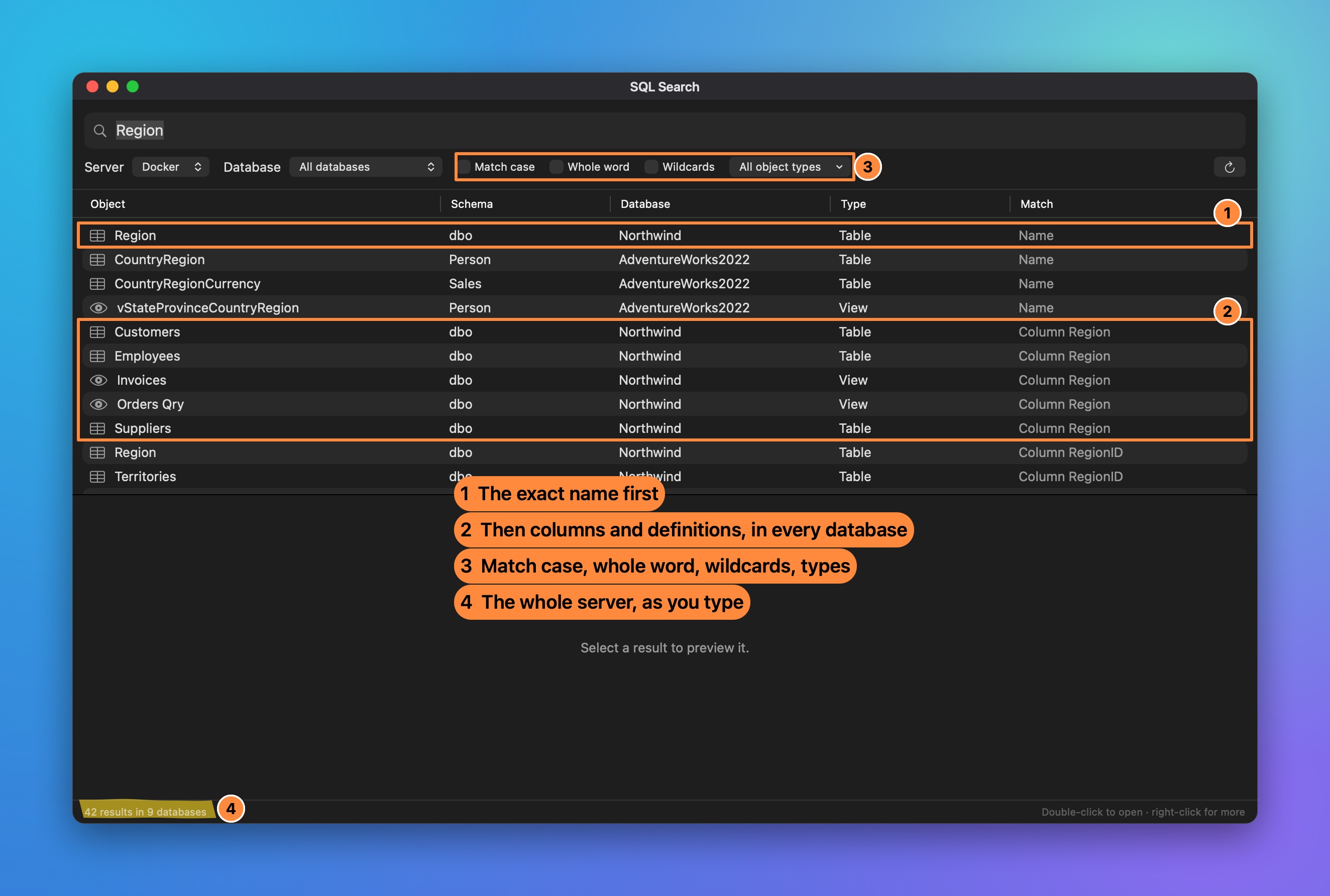
Every name, column and line of procedure, view, function, trigger and Agent job, across every database. The first search reads each database once; after that, results appear as you type.
- Best match first. The exact name, then names that start with it, then columns, then text inside definitions.
- Match case, whole word, wildcards and object types.
- Straight to it. Open the definition, select it in Object Explorer, or find its usages.
Execution plans
Plans that say what's wrong
The diagram SSMS draws, with numbered steps and an explanation of each one in plain English. Then the parts SSMS leaves out.
- Top operators. Every operator by cost, with estimated vs actual rows, flagged when the estimate is 10× off.
- Index suggestions with industry naming and scripts that check before they create.
- Compare with the previous run. Change the query, run it again, and see the cost, the time and which scan became a seek.
- Ask AI to review it. The costly operators, bad estimates and warnings go to your AI model, and the fixes come back.
Admin, without a Windows VM
The SSMS jobs you still needed Windows for
Object Explorer
Servers, databases, tables, programmability, security, Agent jobs and XEvent sessions, with scripting for every object.
Back up and restore
Restore a .bak with file relocation done for you, even one on your Mac into SQL Server in Docker.
Edit data in the grid
Select cells like SSMS, change, add and delete rows (even in tables without a key), edit JSON and XML in a proper editor, then apply it all in one transaction.
Schema Compare
Two databases side by side, differences by object, and a deploy script you read before you run.
ER diagrams and dependencies
Tables with their keys, and what uses what, before you change it.
Run on several servers
One query on many servers, or on the databases you tick or match by name, with the results merged into one grid.
AI assistant
Your model, your keys, your schema
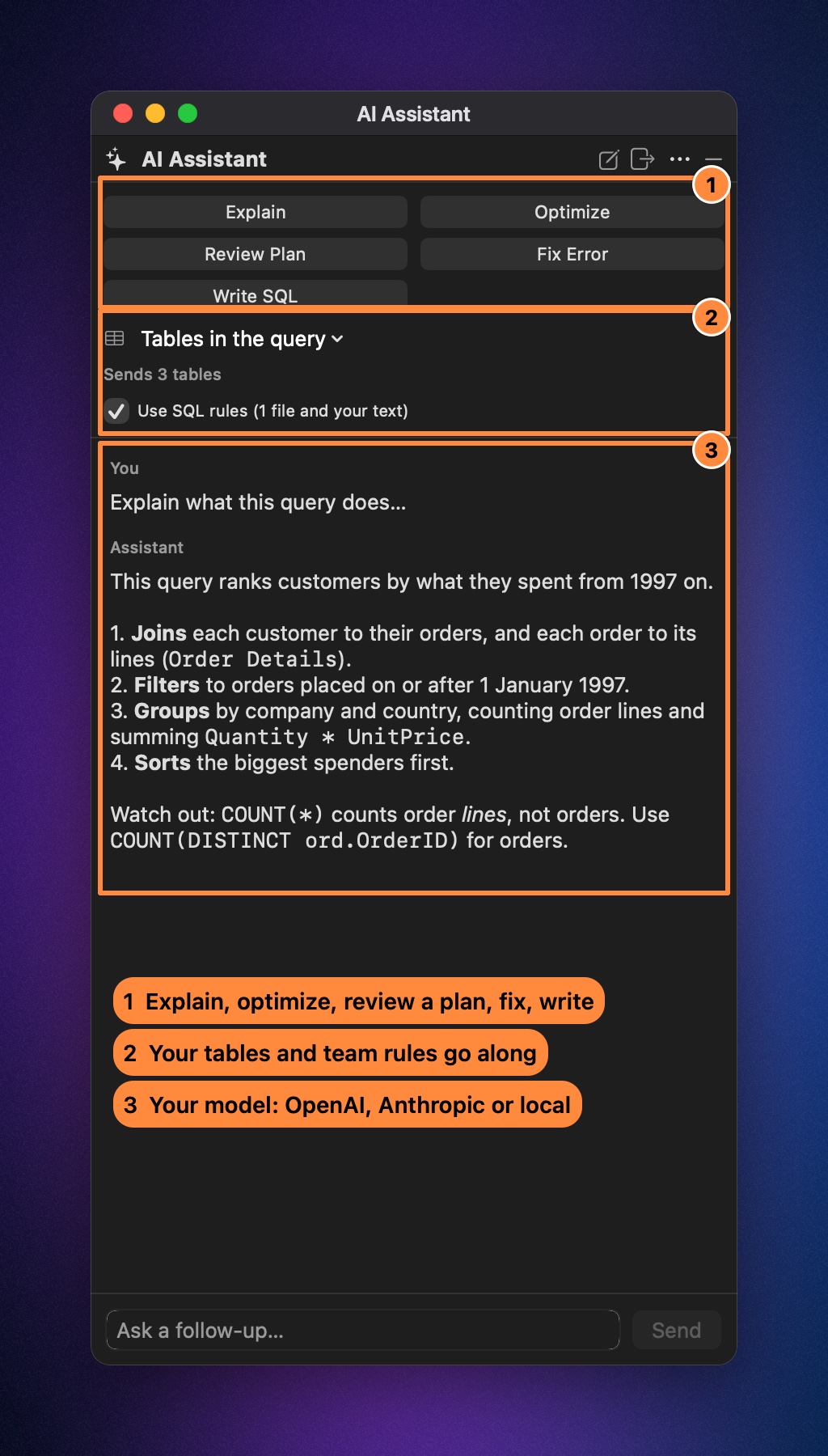
Bring any OpenAI-compatible endpoint: OpenAI, Anthropic, or a model running on your own Mac with Ollama, LM Studio or llama.cpp. It stays hidden until you set it up and its test passes.
- Explain, optimize, fix, write. Ask about the selection or the statement at the cursor, review an execution plan, fix the last error, or turn a comment into a query.
- Knows your tables. The definitions of the tables in the query, or the whole database, or the schemas you pick, go along. Never your rows.
- Follows your team's rules. Point it at your
sql-style.mdand every query it writes follows it. - Beside the editor. A panel on the right (⇧⌘A), pinned or auto-hiding, and production connections ask before anything is sent.
Database tools
The tools you added to SSMS one by one
Each one opens in a tab, works on any connected server, and writes a script you read before you run it.
Reads and time, summarised
Logical reads per table with bars, largest first, and CPU and elapsed time, instead of a wall of messages.
Query StoreTop and regressed queries
The slowest and most frequent queries over a window, the ones that got slower, their plans, and forcing a good one.
Index maintenanceReorganize or rebuild
Fragmentation of every index, the recommended action at your thresholds, and a script for the ones you pick.
Data compareTwo tables, row by row
Rows matched by key across servers, differences side by side, and a sync script, with deletes as an opt-in.
Test dataRows that look real
Names, emails, cities, dates and existing parent keys, picked per column, repeatable from a seed.
Code analysisCatch it before it runs
29 rules, from SELECT * to a variable that doesn't fit its column, with quick fixes, team settings and your own rules.
Native
Made for the Mac, not ported to it
Built in Swift with the Mac's own controls: fast to open, light on memory, with the shortcuts and gestures you expect.
Your passwords stay in Keychain
Saved connections keep their passwords in the macOS Keychain.
Straight to your server
Lukla Data Studio connects directly to SQL Server: on Windows, Linux, or Docker on your Mac.
Colour-tagged connections
Production looks like production, and the status dot tells you whether you're actually connected.
Free during the beta
Every feature on this page, free while Lukla Data Studio is in beta.
Beta
- Editor, profiler, SQL Search, plans, admin and database tools
- The AI assistant, with your own model and keys
- Unlimited connections and servers
- Updates throughout the beta
macOS 14 Sonoma or later.
Questions
Something else? Email support@luklalogic.ai.
Is this an SSMS alternative for Mac?
It's a native Mac app for the work you did in SQL Server Management Studio: writing and running T-SQL, Object Explorer, execution plans, profiling, activity monitoring, backups and restores. It isn't made by Microsoft, and it isn't a port. It's built for the Mac, with the features developers used to add to SSMS through extensions.
What does it cost?
Nothing during the beta.
Which Macs does it run on?
Macs with Apple silicon (M1 or later) running macOS 14 Sonoma or later.
Can I restore a .bak file from my Mac into SQL Server in Docker?
Yes. SQL Server reads backups from its own disk, so a path on your Mac doesn't work in a RESTORE statement. When your server runs in Docker on the same Mac, the Restore dialog copies the file into the container first and works out where each database file goes.
What permissions does the profiler need?
The login needs ALTER ANY EVENT SESSION and VIEW SERVER STATE. The profiler uses Extended Events, the replacement for the deprecated SQL Server Profiler, and removes its session when you stop.
Will it run an UPDATE without a WHERE?
Only after you say so. A statement that would change every row asks first, on every connection by default, and production connections say they're production. You can change this in Settings.
Does it use AI, and which models?
Only if you set it up. In Settings ▸ AI, point it at any OpenAI-compatible endpoint (OpenAI, Anthropic, OpenRouter, or Ollama, LM Studio and llama.cpp on your own Mac) with your own key, and press Test. Prompts carry your SQL and table definitions, never result rows. See the AI assistant.
Can I keep my SSMS shortcuts?
Yes. Settings ▸ Keyboard has keymaps for SQL Server Management Studio, JetBrains DataGrip and Rider, and VS Code / Azure Data Studio, and you can change any shortcut. See Keyboard shortcuts.
Is there documentation?
Every feature is documented, with screenshots and examples, at datastudio.luklalogic.ai/docs. Press ⌘K there to search it.
How do I report a problem or ask for a feature?
Email support@luklalogic.ai. During the beta, every message is read.
Your SQL Server, at home on the Mac.
Free during the beta. macOS 14 Sonoma or later.