 Lukla Data Studio
Docs Editor
Code analysis and quick fixes
Errors and code analysis as you type, quick fixes with ⌥↩ or ⌘., declaring variables, schema-qualifying names, type mismatches, suppressions and your own rules.
On this page
The editor checks your SQL as you type: red underlines for errors from the server's own parser, and yellow and blue ones for code-analysis findings. Most come with a fix one keystroke away.
#Errors as you type
The statement is parsed as you type and again by the server (its PARSEONLY check), so the red underlines are SQL Server's own messages: hover one to read it. Errors from a run are underlined too, and Messages links each one to its line.
PARSEONLY checks syntax only, so a name that doesn't exist isn't a server error until the query runs. The editor checks names itself, against the schema it has loaded:
- An unknown table or view is underlined wherever it appears:
FROM dbo.Custmers. - An unknown column is underlined when it's written with its table or alias,
c.Contry, and that alias names one known table. A bareContryisn't checked, because the editor can't tell which table it should belong to.
Both are yellow warnings, and when there's a name close to it, ⌥↩ offers to change it:
A misspelled column you only find out about from a run (Invalid column name) is marked on its statement, without a fix: write it as alias.column to get one.
#Quick fixes
Put the cursor on an underline and press ⌥↩ (or ⌘. in the Lukla and SSMS keymaps). A lightbulb in the gutter shows when there's a fix on the line. Fixes include:
| Fix | When |
|---|---|
Declare @x int | A variable is used but never declared (Must declare the scalar variable). The type comes from how it's used: WHERE C.CustomerID = @x declares it as CustomerID's type. The cursor lands where its value goes. |
| Declare all undeclared variables | Several are missing in the same batch. |
| Qualify with schema / Qualify all with schema (N) | FROM Customers → FROM dbo.Customers, for one name or every one in the statement or script. |
| Change to Country | An unknown table, or an unknown alias.column, close to a real one: two letters off, or up to a third of a long name (see above). |
Write N'1' | A number given to a string variable (see below). |
Declare @x as nchar(5) | A variable compared with a column of another type. |
Expand * into columns | SELECT * on known tables. |
| Suppress on this line | Any analysis finding. |
When a rule finds several fixable issues, one entry fixes them all, in the statement or in the whole script.
#Example: a variable that doesn't fit its column
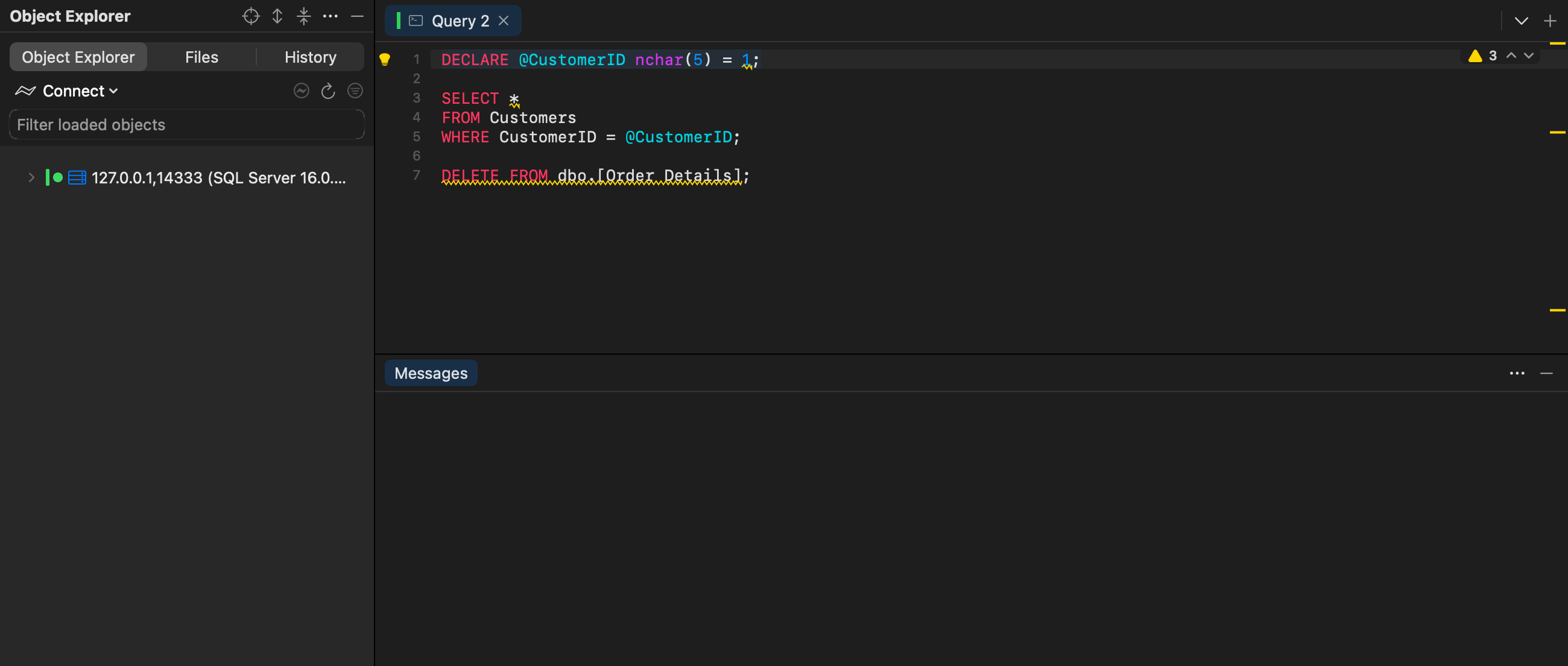
DECLARE @CustomerID nchar(5) = 1;          -- LK020: a number given to an nchar

SELECT ProductName, Total = SUM(Quantity)
FROM dbo.Products P, dbo.[Order Details] OD, dbo.Orders O, dbo.Customers C
WHERE C.CustomerID = @CustomerID
  AND C.CustomerID = O.CustomerID
  AND O.OrderID = OD.OrderID
  AND OD.ProductID = P.ProductID
GROUP BY ProductName;
1 is underlined: giving a number to a string variable makes SQL Server compare as numbers, so string columns get converted (no index seek) and non-numeric values fail. The quick fix writes N'1'.
The same rule catches:
'abc'given to anint(an error: it fails when it runs),'42'given to anint(a hint: write the number without quotes),- a string longer than its
varchar(n)(it's silently cut), - with the schema loaded, a variable compared with a column of another type, such as an
intvariable against annvarcharcolumn, or annvarcharvariable against avarcharcolumn. SQL Server converts the column on every row, so an index on it can't seek. The fix declares the variable with the column's type.
#The rules
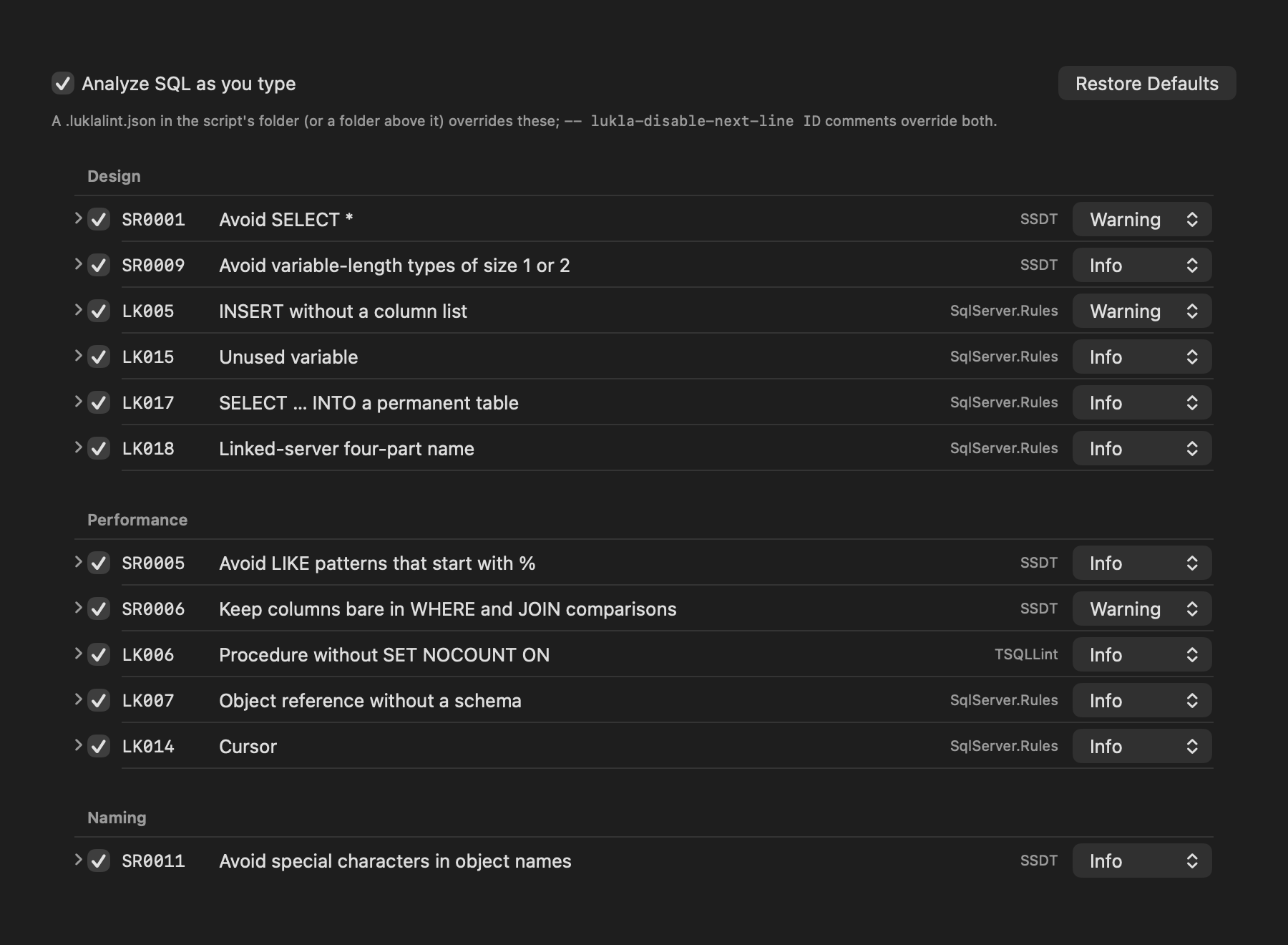
Rules from SQL Server Data Tools (SR…) and Lukla's own (LK…). Change any rule's level, or turn it off, in Settings ▸ Code Analysis; expand a rule there to read why it matters and what to do instead.
| Rule | What it flags | Category | Default |
|---|---|---|---|
SR0001 | Avoid SELECT * | Design | Warning |
SR0005 | Avoid LIKE patterns that start with % | Performance | Info |
SR0006 | Keep columns bare in WHERE and JOIN comparisons | Performance | Warning |
SR0008 | Use SCOPE_IDENTITY() instead of @@IDENTITY | Correctness | Warning |
SR0009 | Avoid variable-length types of size 1 or 2 | Design | Info |
SR0010 | Avoid old-style joins | Deprecated | Warning |
SR0011 | Avoid special characters in object names | Naming | Info |
SR0012 | Avoid reserved words as names | Naming | Warning |
SR0016 | Avoid the sp_ prefix for procedures | Naming | Warning |
LK001 | Avoid NOLOCK | Correctness | Warning |
LK002 | UPDATE or DELETE without WHERE | Correctness | Warning |
LK003 | Use IS NULL instead of = NULL | Correctness | Error |
LK004 | NOT IN with a subquery | Correctness | Warning |
LK005 | INSERT without a column list | Design | Warning |
LK006 | Procedure without SET NOCOUNT ON | Performance | Info |
LK007 | Object reference without a schema | Performance | Info |
LK008 | Character type without a length | Correctness | Warning |
LK009 | TOP without ORDER BY | Correctness | Info |
LK010 | ORDER BY a column number | Style | Info |
LK011 | Dynamic SQL with EXEC() | Security | Warning |
LK012 | Deprecated syntax | Deprecated | Warning |
LK013 | Transaction without COMMIT or ROLLBACK | Correctness | Warning |
LK014 | Cursor | Performance | Info |
LK015 | Unused variable | Design | Info |
LK016 | OS access or inline credentials | Security | Warning |
LK017 | SELECT … INTO a permanent table | Design | Info |
LK018 | Linked-server four-part name | Design | Info |
LK019 | GOTO | Style | Info |
LK020 | Value doesn't fit its type | Correctness | Warning |
LK007 (missing schema) needs the database's schema loaded, so it's quiet until the tab is connected.
#Suppressing a finding
A comment turns rules off where you need to:
-- lukla-disable-next-line SR0001
SELECT * FROM dbo.Orders;

/* lukla-disable LK001 */
SELECT * FROM dbo.Orders WITH (NOLOCK);
/* lukla-enable LK001 */

-- lukla-disable-file LK014
Without rule IDs, the comment covers every rule. Suppress on this line in the quick-fix menu writes the first form for you.
#Settings per project: .luklalint.json
A .luklalint.json in a script's folder, or any folder above it, overrides your settings for scripts there, so a repository can carry its team's rules:
{
  "rules": { "SR0001": "off", "LK007": "warning" },
  "customRules": [
    {
      "id": "no-nolock-hint",
      "message": "Use READ COMMITTED SNAPSHOT instead of NOLOCK",
      "severity": "warning",
      "scope": "statement",
      "match": "\\bNOLOCK\\b"
    }
  ]
}#Your own rules
Add rules in Settings ▸ Code Analysis ▸ Custom Rules, or in .luklalint.json:
- Pattern rules flag a regular expression (
match), optionally unless another one matches (unless), per statement, batch or file. - JavaScript rules get the parsed script and return findings, with optional fixes. They run in a sandbox with no network, file or timer access, and a rule that runs over its time limit is turned off until the app restarts.
// Flag a DELETE that has no WHERE in the same statement.
function check(context) {
  return context.statements
    .filter(s => s.kind === "DELETE" && !s.tokens.some(t => t.text.toUpperCase() === "WHERE"))
    .map(s => ({ offset: s.offset, length: s.length, message: "DELETE without WHERE", severity: "warning" }));
}
Each rule sees context.text, context.tokens (kind, text, offset, length, isString, isComment), context.statements (offset, length, kind, tokens) and context.schema (null when none is loaded). Offsets are UTF-16, as JavaScript string indexes are.
#Problems
- F2 and ⇧F2 jump to the next and previous problem in the editor.
- Query ▸ Analyze Script (⌥⇧⌘A) lists every finding in the script in a Problems tab.
- Analyze Folder in a folder's menu in the Files pane checks every
.sqlfile under it, with progress and Cancel. - Query ▸ Code Analysis ▸ Enabled turns checking as you type off and on.
#External linters
If you use sqlfluff or TSQLLint, add them in Settings ▸ Code Analysis ▸ External Linters. Analyze Script and Analyze Folder run them too (not while you type), and their findings show with IDs such as sqlfluff:LT01 and tsqllint:select-star.