 Lukla Data Studio
Docs Editor
Formatting
Format T-SQL with a built-in style or your own profile, with a live preview, and share profiles with your team.
On this page
⇧⌘F formats the selection, or the statement under the cursor. The menu next to the Format button picks the style. The formatter refuses rather than change what your SQL does: if a result wouldn't parse the same way, nothing changes.
#Built-in styles
The same query in each style:
select c.City, count(*) as Orders, sum(o.Total) as Revenue from dbo.Orders o join dbo.Customers c on c.Id = o.CustomerId where o.Status = N'Shipped' and o.Total > 100 group by c.City order by Revenue desc;#Standard
Keywords start their lines, one column per line, joins and extra conditions indented.
SELECT
    c.City,
    COUNT(*) AS Orders,
    SUM(o.Total) AS Revenue
FROM dbo.Orders o
    JOIN dbo.Customers c ON c.Id = o.CustomerId
WHERE o.Status = N'Shipped'
    AND o.Total > 100
GROUP BY c.City
ORDER BY Revenue DESC;#Compact
Each clause on one line.
SELECT c.City, COUNT(*) AS Orders, SUM(o.Total) AS Revenue
FROM dbo.Orders o
JOIN dbo.Customers c ON c.Id = o.CustomerId
WHERE o.Status = N'Shipped' AND o.Total > 100
GROUP BY c.City
ORDER BY Revenue DESC;#Leading commas
Commas start the line, so a column is easy to comment out.
SELECT
      c.City
    , COUNT(*) AS Orders
    , SUM(o.Total) AS Revenue
FROM dbo.Orders o
    JOIN dbo.Customers c ON c.Id = o.CustomerId
WHERE o.Status = N'Shipped'
    AND o.Total > 100
GROUP BY c.City
ORDER BY Revenue DESC;#River
Clause keywords right-aligned on a "river", so the clauses line up.
SELECT c.City,
       COUNT(*) AS Orders,
       SUM(o.Total) AS Revenue
  FROM dbo.Orders o
  JOIN dbo.Customers c
    ON c.Id = o.CustomerId
 WHERE o.Status = N'Shipped'
   AND o.Total > 100
 GROUP BY c.City
ORDER BY Revenue DESC;#Indented
Every clause's body indented under its keyword.
SELECT
    c.City,
    COUNT(*) AS Orders,
    SUM(o.Total) AS Revenue
FROM
    dbo.Orders o
    JOIN dbo.Customers c
        ON c.Id = o.CustomerId
WHERE
    o.Status = N'Shipped'
    AND o.Total > 100
GROUP BY
    c.City
ORDER BY
Revenue DESC;#Make your own profile
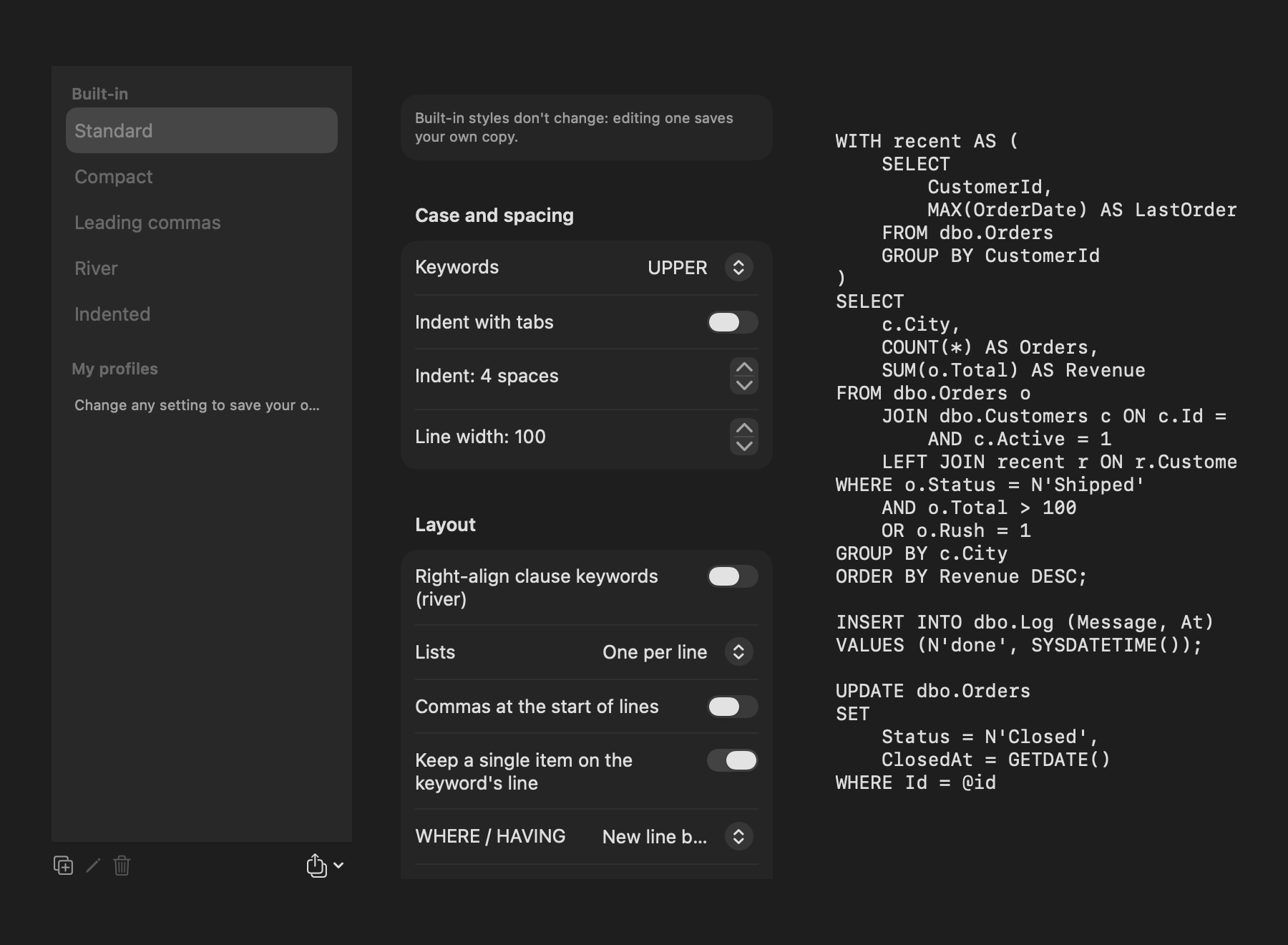
Built-in styles don't change: changing any setting while one is selected saves your own copy under My profiles. Each profile sets:
- Case and spacing: keyword case, tabs or spaces, indent width and line width.
- Layout: right-aligned clause keywords (river), one list item per line or packed, commas at the start of lines, a single item kept on the keyword's line, where
WHERE/HAVINGconditions go,JOINindented underFROM,ONon its own line, and theFROM/INTO/VALUEStarget on the next line.
The preview on the right shows a sample script in the profile as you change it.
#Share profiles
The export button under the list saves a profile as a .json file; import loads one, so a team can share one style. Imported values are checked and kept within sensible limits.